Showing posts with label invoicing. Show all posts

Thursday, November 22, 2012

NETOOX News

Today's post is a summary of some of the new features in your NETOOX Online Swiss Army Knife.

Events

Being one of the biggest new features, group admins can now manage a list of events. Group members can send out event invitations to address book entries. A special new placeholder was introduced that can be used in eMail templates and will be replaced by the event's information upon eMail delivery. 


Also: Events can have file attachments which will be sent along with the outbound eMails (e.g. detailed description of event, hotel, how to get there, ...).
In the eMail dialogs (single or mass mail) you can select which event you wish to have inserted. NETOOX will even adjust the times according to the timezone settings of the event and the recipients!

Country in Recruiting Forms

Leads can now also select their home country in all NETOOX recruiting forms (embedded forms and NETOOX homepage designs). This new field is also pre-selected according to the visitor's origin. Knowing the country of a new lead can, for example, help determine the correct phone number if no country code has been given!

Address Book: vCard & QR-Code

Now you can download a vCard file (.vcf) of any contact from your address book and even scan a special QR-Code with your smart phone to quickly get the contact info into your phone's address book!

Invoicing: Read Receipt

All users of the "Invoicing" module will appreciate this new little helper: NETOOX now automatically requests a "disposition notification" (= read receipt) when sending invoices to customers.

Custom Mail Signature Text

As you already know, NETOOX automatically generates eMail signatures for outgoing mails based on your profile data. Now you can also add some custom text to eMail signatures!


Remember: Use the "My (business/product) signature" placeholder in eMail templates to have NETOOX replace it with your personal profile image, contact information and (new) optional custom text.


Thursday, September 27, 2012

[en] New Features


With today's system update we publish several cool features! Here's an overview:


Adress Book: Company

All contacts in your address book now have a new field "Company" which you can fill with the name of the organization the person works for. This will also show up in the search result list and you can search your address book for companies.
Use the field "Label" to set a special display-name if required (e.g. "Team Jane & John Mullen").


Invoicing: Quotes

Now you can not only create invoices and credits, but also quotes. Simply set up one or more templates of type "Quote" and then create vouchers as usual. Cool.


Address Book: Send EMails

When you send emails from your NETOOX address book, instead of the email preview window, you can now open a new dialog that lets you change the subject and body text before sending the email! Of course the red send-button is still available and sends the email out immediately.

Thursday, August 30, 2012

[de] NETOOX Verbesserungen

Mit dem heutigen System-Update veröffentlichen wir viele Verbesserungen, die dir bei deiner Arbeit helfen werden!

Hier ist ein Überblick über einige der neuen Funktionen und Möglichkeiten, die übrigens teilweise von NETOOX Nutzern vorgeschlagen wurden :)

Rechnungslegung

1) Du kannst nun direkt im Adressbuch von einem geöffneten Kontakt weg eine neue Rechnung/Gutschrift erstellten. Das spart dir mehrere Klicks und die Suche nach dem Kontakt, da du nicht mehr selbst das Rechnungslegungsmodul öffnen und dort den Namen eintippen brauchst!

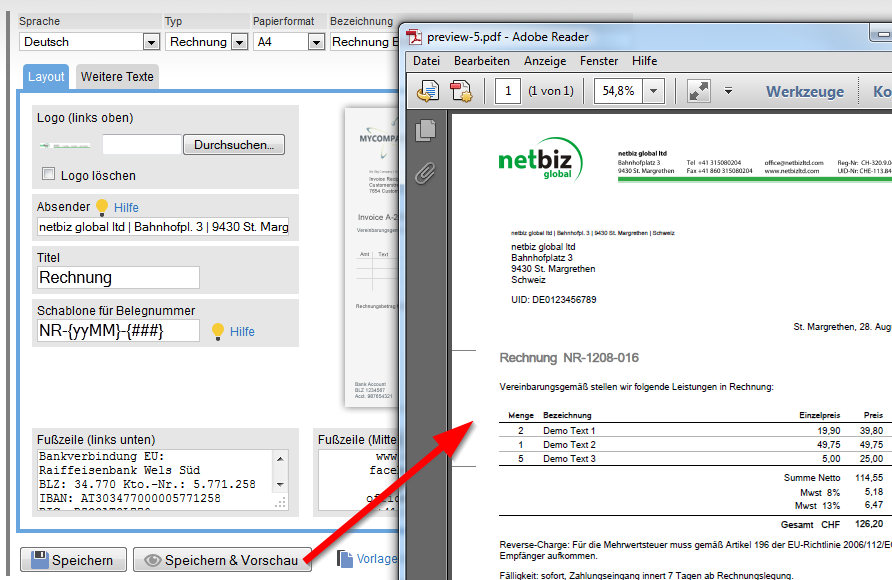
2) Vorlagen-Vorschau: Hast du eine Vorlage für Rechnung oder Gutschrift zusammengestellt, kannst du dir nun eine Vorschau generieren lassen um zu sehen, wie ein Rechnungs-PDF aussehen wird. Für die Vorschau werden als Rechunngsempfänger deine eigenen Daten eingesetzt, eine zufällige Rechungsnummer verwendet und 3 Beispiel-Zeilen angeführt.

Hilfe

Einige Hilfe-Links betreffen Detail-Themen, die Teil einer größeren Hilfe-Seite sind. Diese Details werden nun sofort angezeigt und gelb hinterlegt hervorgehoben, wenn du einen Hilfe-Link anklickst. So brauchst du die für dich momentan relevanten Informationen nicht mehr extra auf der ganzen Seite suchen.


... und viele andere Optimierungen, Korrekturen und Verbesserungen an mehreren Stellen im System!